Showing posts with label MicroKorg. Show all posts

Thursday, June 10, 2010

How to set up a Behringer BCR2000 to control the MicroKorg

I've got a MicroKorg, and I've set up a BCR2000 to tweak more of the parameters at once!  Read on to see how to do it!


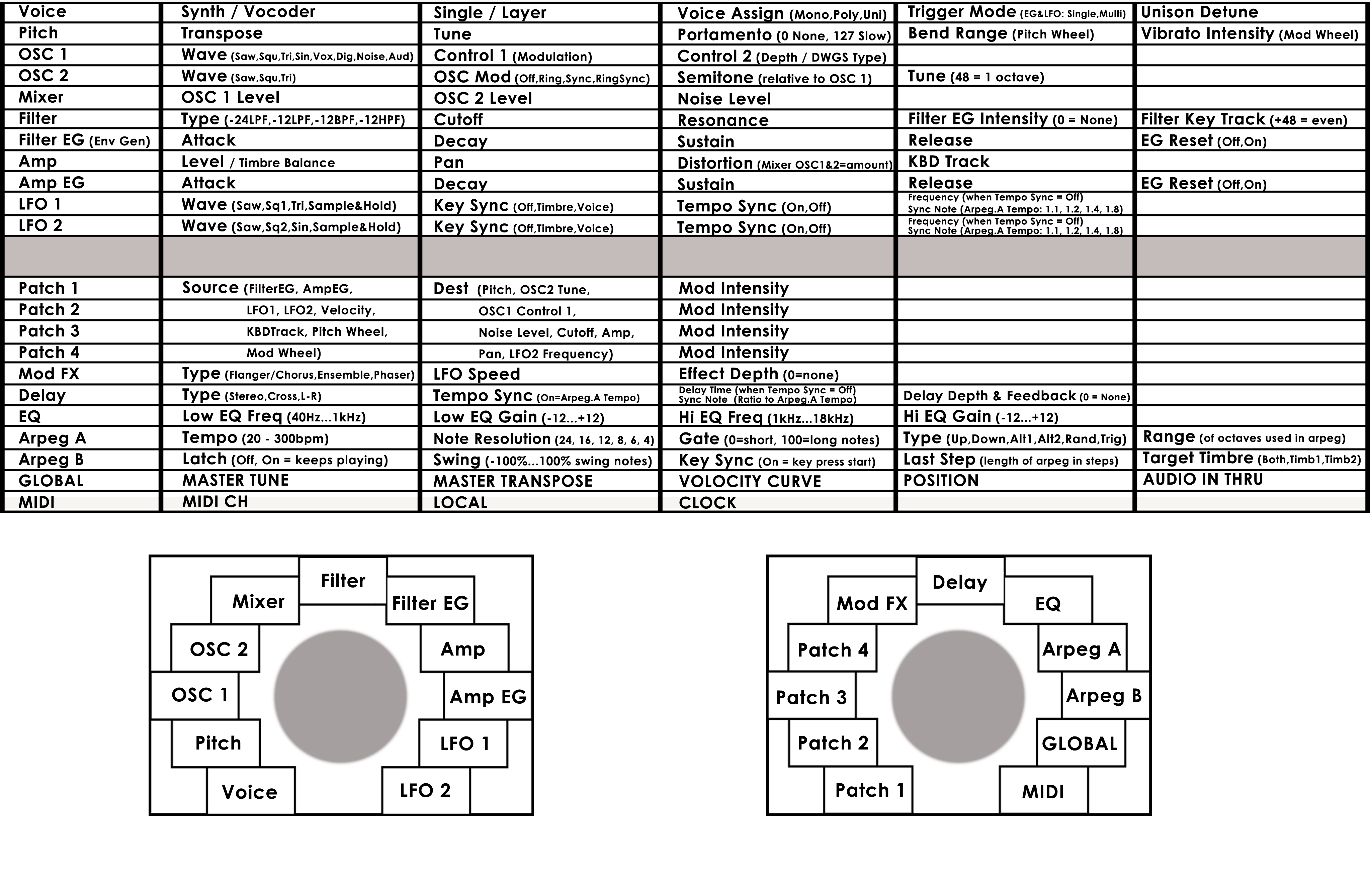
I found the Edit Matrix on the MicroKorg a bit hard to follow visually, so I made a custom overlay for the face of it to make things easier (see MicroKorg Customface).


But I thought I'd take it a step further! I wanted to be able to tweak more parameters at once, so I could adjust more parameters immediately and simultaneously (like on a fully featured synthesizer interface).


So I decided to buy a Behringer BCR2000, and see if I could map all the knobs and buttons to various parameters on the MicroKorg. It turns out that you can! And it does a pretty good job of it!


BCR2000 Programming Instructions
I've made a document that outlines how to make the settings step by step.


BCR2000 Overlays
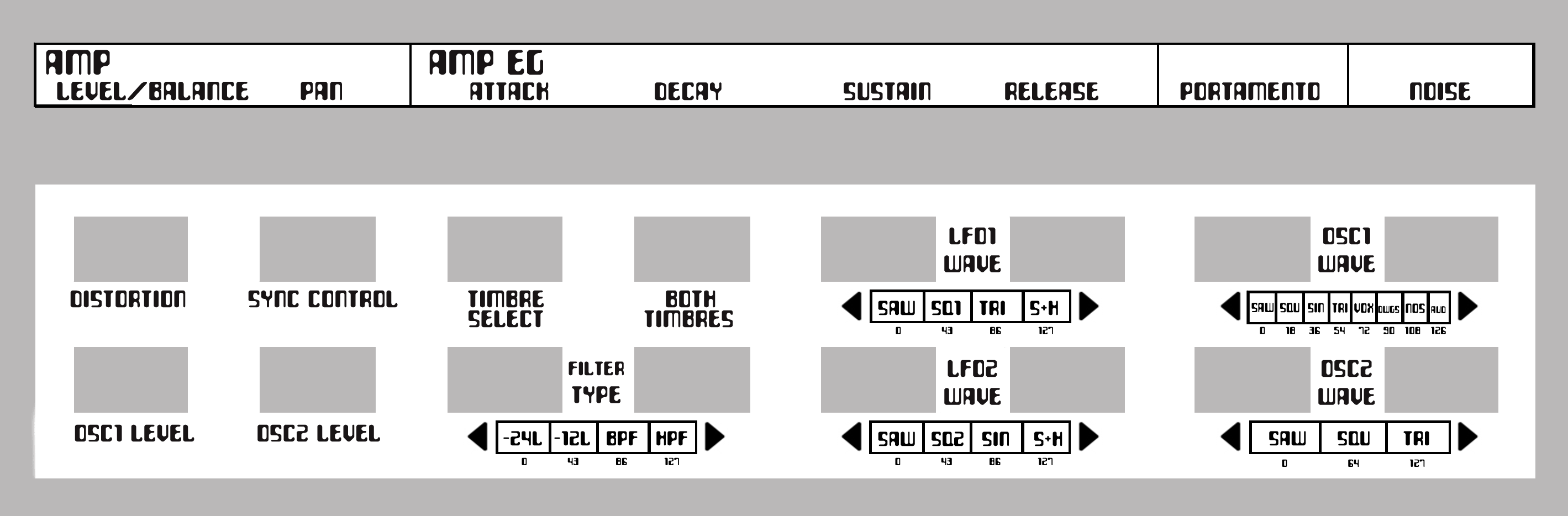
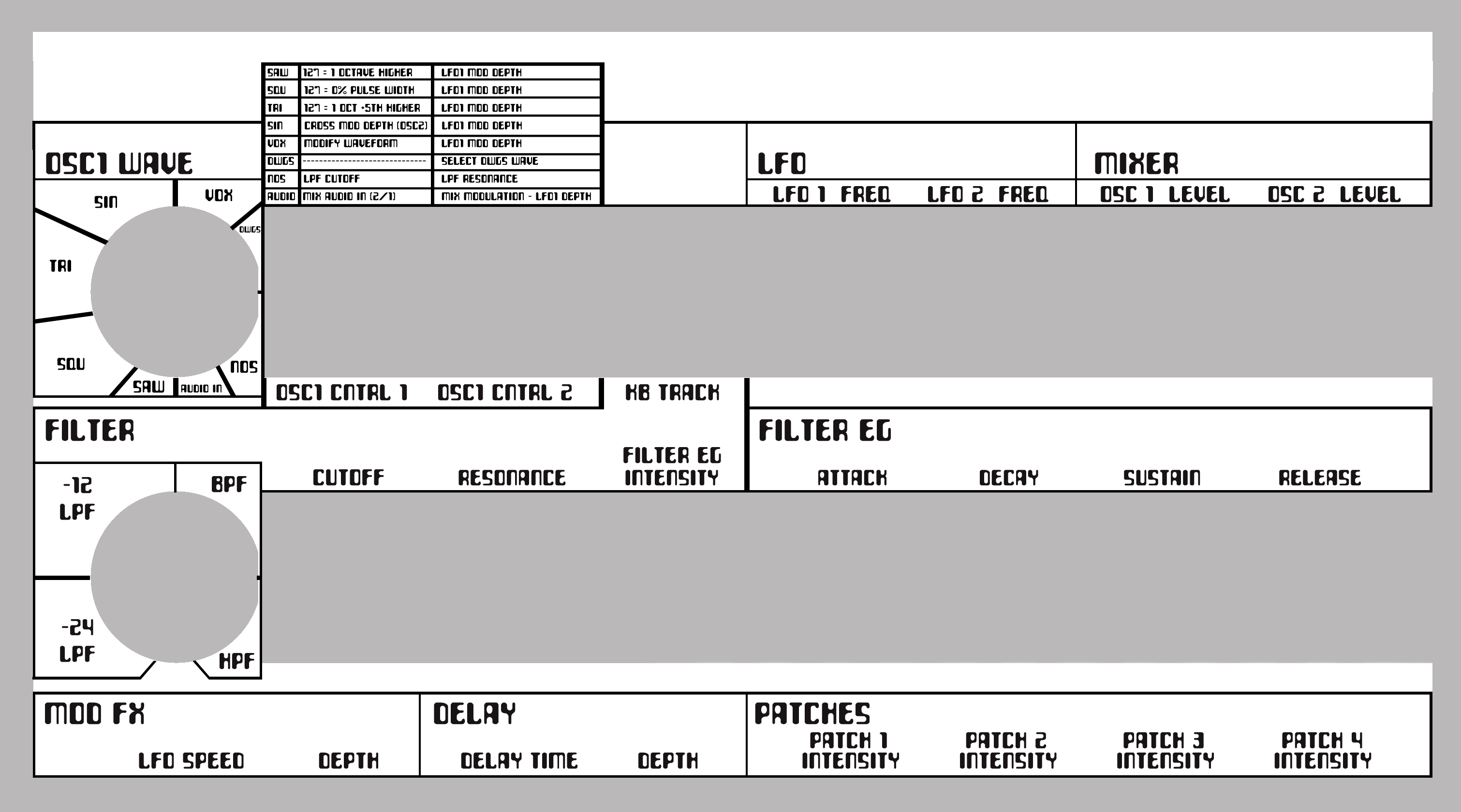
I've also made two overlay images that can be printed out (at 100% size, on landscape A4 paper) that you can blu-tack to the top and bottom of your BCR2000, so you can easily see what each control does!


You'll need to follow the document to program the settings into your BCR2000. It basically uses MIDI CC (Control Change) values to speak to the MicroKorg.  You don't really need to do anything to the MicroKorg - it will automatically communicate back to the BCR2000 when you tweak knobs on the MicroKorg interface.


You simply follow the instructions in the document, and save it as a Preset on the BCR2000, and you're done!  That'll be saved on there permanently, and it's ready to go as soon as you turn them on and plug them together.  You just need a BCR2000, a MicroKorg and two MIDI cables.


UPDATE:  If you don't want to program it in manually, you can download BCRFEdit, a user made application for importing, exporting, creating and editing your own presets for the BCR2000 (it seems much better than the application provided by Behringer), and you can use this to transfer my preset straight to your BCR2000 without having to manually make all the settings yourself.  You can download the SysEx file for my Preset here.  Enjoy!  Just be careful not to overwrite or lose any of your own presets when using BCFREdit.


Help Wanted!
I'd LOVE it if anyone could help me with the final piece to the puzzle!  My only remaining question is, how do I get the MicroKorg to send all the values over to the BCR2000, each time you switch to a new "instrument" on the MicroKorg? 


Everything else works 100%. I believe you are meant to be able to make the BCR2000 send a Data Dump Request to the MicroKorg, thus receiving all the new values, so the BCR2000 is lit up to reflect the values on the MicroKorg.  You should also be able to set up the MicroKorg to send a Data Dump over to the BCR2000. But I haven't been able to get either operation to work.   Please help if you know how!


I'd love to hear what people think of it! It's well worth doing, if you want to be able to really tweak the sounds live!


Check out this two part video I made that goes through the process...


Part 1


Part 2

Sunday, April 25, 2010

MicroKorg Customface

MicroKorg Customface

This is a custom overlay I created to stick over the face of my MicroKorg.


I found it really hard to use the MicroKorg, because it's so difficult to read the lines of controls under each knob, in relation to where you had each Edit Select knob positioned. It did my head in! Korg should have at least drawn lines for each row to help the ol' eye-balls.  Or even better, color coded the different rows in some way.

So... I created my own OVERLAY in Photoshop and stuck it over the front! It's only for the Synth mode, and doesn't cover the Vocoder, but that's fine for me. Most of the controls are shared between the two anyway. If I ever want to tweak a vocoder setting one day, I'll have to figure out a solution, but let's face it, most people must be using the synth 95% of the time, and mostly using vocoder presets anyway. (That's how I'm justifying it to myself, anyway...)

On my overlay, I've also added some basic notes about settings that aren't clear from the readout, such as listing the wave types available for that function. This makes the information a bit more accessible without having to get the manual.

Personally, I think my overlay makes things much easier and more intuitive, and therefore more fun and playful! 

I'd like to know if anyone else struggles with the MicroKorg interface, and if this helps them. I've color coded mine (with pencil, after printing it out!) so you can see which knob settings correlate to which row of functions. That was the main goal for me!

In the process of making it I also read the manual more thoroughly, which helped bring everything into focus! Hooray.


Download the fullsize MicroKorg Customface overlay and print it out for yourself!

Here's a little preview version of it...

You'll have to figure out how to print it the right size. It should fit perfectly if you get it right!  Print it in landscape on A4 and see how you go.

You'll have to color it in yourself, too! I was going to color it in Photoshop, but I only have a black and white printer at home, so I just colored it myself with pencils. I used the same color family for related sections (all LFOs are blue, OSCs are warm colors, ARPEGs are purpley colors), and left a few sections white to keep it from getting muddy with colors (the Patch section, GLOBAL, MIDI, and Voice).

To stick the overlays over the dials, just cut each one out separately, then cut straight up from the bottom-middle with scissors, then cut away the grey circle. Voila! Now just slide it down behind the knobs and sticky tape it all into place.

Let me know if you put one on yours!  I'd love to see your coloring job.  :)